
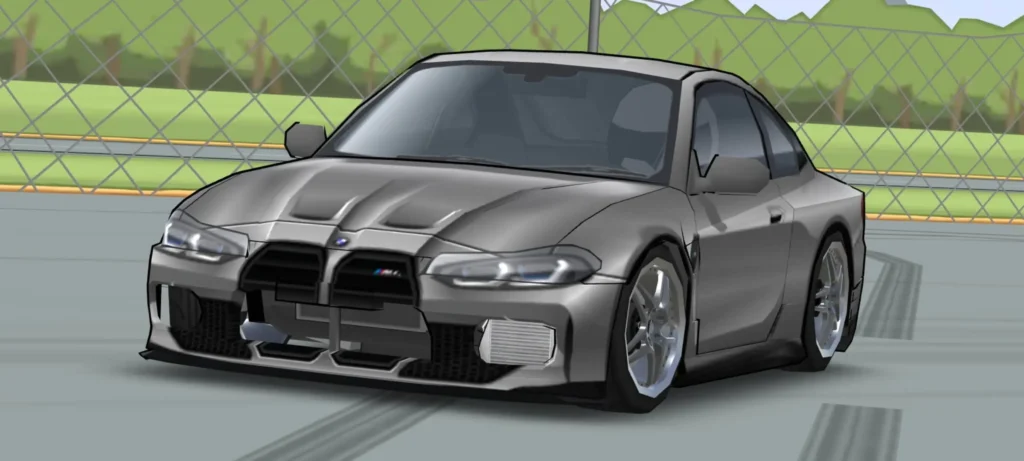
FR Legends BMW M4 Livery Codes: Every Variant, Full Import Guide & Customization Tips (2026)
By Rizky Pratama
June 01, 2026
The BMW M4 is one of the most searched liveries in FR Legends, and also one of the most frustrating to actually get. Most sites that show up in Google either lock the code behind a YouTube subscribe button or list it without telling you which car model it applies to. Then you paste it and nothing works, and you’re left wondering what went wrong.
This guide skips that nonsense. Here you’ll find working livery codes for every BMW M4 variant currently available in FR Legends, a clean step-by-step import process, and enough context to fix any issue that comes up, including the version compatibility problem almost nobody talks about.
The BMW M4 in FR Legends: Which Version Do You Have?
Before you paste any code, you need to know which BMW M4 you’re working with. There are four distinct versions that appear across FR Legends and its modded variants, and a code designed for one will either apply incorrectly or not apply at all on another.
- BMW M4 Competition (base game) — The most common version. Available as a standard playable car. Built around the S58 twin-turbo inline-six, this is the model most livery creators target. If you’re searching for “BMW M4 livery code” and don’t know which version you have, this is probably it.
- BMW M4 F82 — The previous-generation M4 (2014–2020), identified by its sharper, more aggressive styling versus the G82’s wider fender flares. Livery codes made specifically for the F82 chassis reference different geometry, so they may misalign on the G82.
- BMW M4 G82 — The current-generation car with the distinctive (and controversial) large kidney grille. Some livery creators have started building G82-specific designs that work with the car’s broader proportions.
- BMW M4 GT3 EVO (G82) — A race-spec variant that appears as a livery skin mod in some community modpacks. This is not always available in vanilla FR Legends installs and requires the correct modpack base.
If you’re using stock FR Legends without mods, the M4 Competition is your car. If you’re running a community modpack, check which base vehicles are included before selecting a livery.
BMW M4 Competition Livery Codes (2026)
The codes below are sourced from community livery creators. FR Legends livery codes come in two parts — a body code and a window code. You need to apply each separately. Both are included below.
These codes are formatted as they appear in the game’s import field. Paste the entire block — all lines — at once. Do not paste line by line.
BMW M4 Competition — Motorsport Stripe Style
Creator credit: @DoriftoDA (YouTube). Aggressive M Motorsport color scheme with the classic blue/red/purple tricolor stripe on white base.
000200000000035203520000D1D1D1FF0001 0202FDD102DD00640023FFFA000000FF0005 0202FDD102D700640023FFFAA70000FF0005 0201FE750318003F002BFFE3000000FF0005 0201FE750315003A0028FFE1A70000FF0005 0204FF2B031D00810044FFEA000000FF0005 0204FF370317007C003DFFE9A70000FF0005 0202FF9503A30088004CFFEE000000FF0005 004BFEED03A3FFD1FFCE0078000000FF0005 0202FF95039F00820051FFEEA70000FF0005
0053FFC5032F038101B30000BD0000C20005 0006FCCD000002AB0201FFA6000000C80001 000603B2000002AB0201FFA6000000C80001 07DF00670377001600160001FFFFFFFF0005 065500E2039C002A002A0000FFFFFFFF0005
Version note: These codes were built on FR Legends v0.3.x. If you’re running an older build and the design looks misaligned, update the game first. If you’re running a very new version and something looks off, the layer coordinates may need minor adjustment — use the edit mode to nudge affected stickers.
BMW M4 F82 Livery
The F82 has a narrower rear and shorter tail than the G82. Codes built for it tend to use tighter geometry in the rear quarter. Community-sourced F82 liveries appear most often as track-style designs referencing real BTCC and DTM liveries.
For current working F82 codes, frlmods.com maintains a dedicated BMW M4 F82 page updated by the community. The creator behind the most widely shared F82 liveries goes by @DoriftoDA on YouTube — their channel is the most reliable source for new codes with video previews.
The F82 page on frlmods.com previously gated its code behind a YouTube subscribe. At time of writing, the full code is accessible by visiting the page directly. If it’s gated again, the YouTube channel description usually contains the current code.
BMW M4 G82 / GT3 EVO
The G82 GT3 EVO is the most visually striking of the M4 variants in FR Legends — it brings full GT3 aero (large rear wing, splitter, diffuser) and usually comes in either white-with-M-stripe or a darker carbon-heavy scheme. If you have the correct modpack installed, the livery code is community-generated and changes regularly.
For the latest G82 and GT3 EVO codes, the most current source is the creator’s Instagram linked in the frlmods.com listing for the GT3 EVO G82. The code format is identical — paste body and window separately.
Body Code vs Window Code: What's the Difference?
Every livery in FR Legends is split into two layers: the body code handles everything on the car’s exterior panels — paint color, racing stripes, decals, sponsor logos, and panel graphics. The window code handles the glass separately — window tint, sun strips, banner stickers, and any text or graphics placed across the windshield or rear glass.
Most liveries look incomplete without both. A body code alone will make the car’s panels look right but leave the windows stock. Applying only a window code to a default car will give you tinted glass on a plain-colored body.
Understanding How the Code Actually Works
FR Legends livery codes aren’t random strings. Each line represents a single design layer — a shape, color, decal, or sticker positioned on the car’s surface. The format encodes the layer type, its position (x/y coordinates), size, rotation, and RGBA color value all in one line.
Layers stack from the first line (bottom/base) to the last line (top/foreground). So the first line is usually the solid base paint color, and subsequent lines add stripes, logos, and text on top of it. This matters when you’re editing — if you want to change the base color, you edit the first line. If a sticker is sitting over the wrong area, you find its line and adjust the position values.
This also explains why codes from different game versions can look wrong. If a creator built their livery on v0.3.2 and the current version slightly changed the car’s UV map (how 2D graphics wrap around the 3D model), coordinates that were correct before will shift.
Creating Your Own BMW M4 Livery: M Colors & Classic Schemes
Importing an existing code is the fastest way to get a good-looking BMW M4. But if you want something unique — or if you’re building a livery to share with the community — knowing the actual BMW M colors helps enormously.
BMW M Motorsport Tricolor (Classic)
The iconic stripe uses three colors in order: blue (#0166B1), purple (#B0007E), and red (#E03128). In FR Legends, you’d create three parallel stripe layers using these hex values converted to the game’s RGBA format. The classic stripe runs from left fender over the hood and roof to the right quarter panel.
Isle of Man Green
One of the most popular BMW M4 G82 colors, Isle of Man Green (#316B48) is a deep forest green with slight metallic shimmer. In FR Legends, simulate it with a dark green base layer and a near-transparent lighter green overlay at low opacity.
Sao Paulo Yellow
A signature M color for track-spec builds — Sao Paulo Yellow (#F2C811) as the base, paired with black accents on mirrors and roof. This combination works especially well on the GT3 EVO body because the aero parts naturally frame the yellow.
Livery Code Not Working? Fix These 5 Issues
1. You pasted a partial code
This is the most common issue. Some sites only show the first few lines of a code, or the copy button cuts off partway through. Always count the lines in the code block and compare to what’s in your clipboard. If a code has 12 lines and you only pasted 8, it won’t apply correctly.
2. Wrong car selected
A BMW M4 Competition code applied to the BMW 320i or M3 will either error out or produce a scrambled result. Always confirm you have the correct base car selected before importing.
3. Game version mismatch
Codes from v0.3.x can shift on newer builds. If the design looks correct in preview but wrong after applying — stripes in the wrong place, stickers floating off the panel — update FR Legends to the latest version and try again.
4. You applied body code to the window slot (or vice versa)
The import field looks the same for both types. If you paste a body code into the window field, nothing will visually change (or it’ll error). Double-check you’re in the right slot before pasting.
5. You forgot to duplicate the car
This doesn’t stop the code from working — but if the result isn’t what you wanted and you hit apply, you’ve overwritten your existing livery. The game has no undo for livery changes. Always duplicate first.
Where to Find New BMW M4 Livery Codes
Codes go stale and new ones appear regularly. Here’s where the actual community sources live:
- frlmods.com — The most active dedicated livery aggregator. Search “BMW M4” directly; they have separate pages for each variant.
- YouTube — @DoriftoDA — Consistently produces high-quality BMW M4 liveries with video previews. The code is usually in the video description.
- Reddit — r/FRlegends — Community posts frequently include livery screenshots and codes in comments. Search “M4 livery” to filter.
- Discord — FR Legends community servers — The fastest source for brand-new releases; creators often post here first before YouTube or websites.
When a site asks you to subscribe before showing the code, check the video description directly on YouTube instead. Most creators include the full code there without restrictions.
Frequently Asked Questions
How do you use a livery code in FR Legends?
Open FR Legends, go to the Garage, select your car and tap Livery. Choose Body or Window, tap Import, then paste the full code block and tap Apply. Repeat for the second code type. Always duplicate your car first so your original livery is preserved.
What is the difference between a body code and a window code in FR Legends?
A body code controls the car’s exterior panels — paint, stripes, decals, and logos. A window code controls the glass — tint, sun strips, and window stickers. Most complete liveries require both codes applied separately.
Why is my FR Legends livery code not working?
The most common causes are: pasting only part of the code, selecting the wrong base car, applying a body code to the window slot (or vice versa), or a game version mismatch where the code was built on an older version. Update the game, select the correct car and code type, then paste the complete code block.
Can I edit a livery after importing a code in FR Legends?
Yes. After applying a code, every layer is editable. Tap any layer in the livery editor to change its color, resize it, rotate it, or reposition it. This lets you personalize community codes without starting from scratch.
Do FR Legends livery codes work on iOS and Android?
Yes. The livery system is identical on both platforms. Copy the code on any device, paste it into the import field in the game, and it will apply correctly regardless of operating system.
What BMW M4 variants are available in FR Legends?
The BMW M4 Competition is available in the base game. The F82 and G82 variants, as well as the GT3 EVO G82, appear in community modpacks. Livery codes are variant-specific, so confirm which version you have before importing a code.
Where is the best place to find new BMW M4 livery codes for FR Legends?
The most reliable sources are modapkfrlegends.com, frlmods.com (dedicated livery aggregator), the YouTube channel @DoriftoDA (codes in video descriptions), Reddit’s r/FRlegends community, and FR Legends Discord servers where creators post first.